
Tuesday, July 8, 2008
Flash Drive Reminder is a freeware utility that pops up to remind you when you log off Windows
There are Standard and Quite version. Standard version pops up window when Reminder starts and come with minimizing reminder window to the Taskbar and display flash drive's files on when Reminder starts. Ouiet version only pop up window when you log of window without removing your flash drive.
Click to download Standard version
Click to download Quiet version
Related Topic
- Another way of Reading Dictionary
- Cool Aviator Creator
- Training Your Listening & Note Taking Skill...
- Yahoo offer New Email Account...
- Another way e-mail spamming !
Labels: Utility

Saturday, February 16, 2008

Nowadays most websites are equipped with RSS Feed and via feed reader (e.g. Google Reader) you will be notified for update of any web pages within a websites. What about those websites do not comes with RSS Feed ?
Update Scanner, a Firefox add-ons is the utility that you need. You may monitor update of any website as long as you include it in the scan list. In addition, those are being updated will be highlighted in yellow (See below image). Huh...such an awesome utility.

You may just install this Firefox add-ons for website update notification. One of pre-requisite is you may equipped with Firefox. Install Firefox now...
There are some features available in this add-ons.
- Choose website scan interval
- Highlight changes
- Ignore minor changes is allowed
- Full international support
 As blogger i like it very much as it helps me to monitor lost link in my blogs. In many cases, some key words in your website or blog may link to other website or blog. In the event linked page is remove, it will shown in gray to signify removal of this page. Apart, in the event linked page updated with new information, you will aware and take necessary response to it.
Related Topic
Labels: Blogging, Utility, Web
Monday, February 11, 2008

Personally i see the utility is great and very useful. As you read any contents in any website, you find the content is important, you can just captured and temporary park it for future reference or access in detail when you are free. You can treat as "Bookmark" for content and website.
As blogger, you may read a lot of article but somehow you may want to capture those content for reader reference... you may use this utility.
As blogger you may want to get more traffic and you don't want your reader bored with long conntent, huh... clipmarks is properly help you a lot.
Let see a the clipmarks i have created. Your readers only need to browse the 1st and 2nd paragraph. Interested user can click to read in detail.
Related Topic
- Google HanYu PinYin Input Method...another choice other than Chinese Star
- Permanently & Securely remove file from your hard disk
- Calculation BUG in EXCEL 2007 and its FIX...
- FREE Tracking Incoming Link Using Technorati URL
- DIMDIM - FREE Open Source web meeting
- ZAP READER - Another way to read article...
- FREE Stabil, Safe & Fast Web Browser other than IE
Labels: Utility
Thursday, December 13, 2007
 Firefox has recently released Firefox 2.0.0.11. According to release note, Firefox 2.0.0.11 has fixed a bug introduced by the 2.0.0.10 update in the
 [canvas] feature that affected some web pages and extensions. Please updates yours now.
This tool already there for long time but i just installed this add-on recently. It works quite well for me...
Using Gmail manager, you may displays account details including unread messages, saved drafts, spam messages, labels with new mail, space used, and new mail snippets. Now i can open all my accounts simultaneously...Ha ha...
Visit LongFocus for more installation and setting details.
Related Topic
- FireFox Upgraded to 2.0.0.8 - FREE Stabil, Safe & Fast Web Browser
- Google HanYu PinYin Input Method...another choice other than Chinese Star
- Permanently & Securely remove file from your hard disk
- YouTube with Adsense Embeded video unit extended to UK, Ireland & Canada
- Inside AdSense: Introducing video units
- Google Adsense Launch Video Units
- WidgetBucks - New Advertising Option for Online money Maker
Labels: Utility
Thursday, October 18, 2007
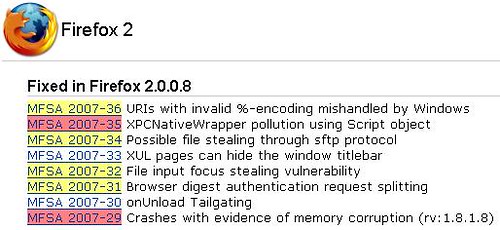
You should really think about getting it now. Following button will direct you to install FREE Firefox in to your PC.
Labels: Browser, Utility, Widget

Google Lab has launched its FREE Hanyu PinYin Input method since April 2007. Have spend sometime to learn the main features of this FREE software.
The main features of Google HanYu PinYin Input Method :
- Intelligent sentence building with smart high accuracy word interpreting and choice including support for long phrases or sentences.
- Integrate popular vocabularies and phrases from Internet and web searches for richer phrases database.
- Able to personalize the Chinese character input method where your usage habit and personal dictionary are linked with Google Account, and can be sync and used everywhere on other computer on the Internet.
- Input box for Chinese language is also the input box to search the web by simply clicking on a button.
- Intelligent error correction for commonly misspelled words.
- Support user defined short phrases for some special shorthands.
- Able to suggest English word based on the first few letters typed to ease the process to enter English input in Chinese input environment without the need to switch input language to English or Chinese by preceding the strokes with letter v. This function will also help users who have problem spell English words.
- Support Hanyu Pin Yin acronym and fuzzy phonetic for speakers from different areas that may pronounce a alphabet differently. When enabled, sounds in zh, sh, and ch can be represented by z, s, h.
- Google Chinese PinYin input method dynamically adjust the order of the Chinese words or phrases selection sequence based on the past usage frequency.
- Support input of traditional Chinese (Big5 or GBK character set).
- Provides GBK large font resources (extension of the GB2312 character set).
- The most frequently used words and phrases will always been shown first to speed up typing speed.
- Support also stroke input method for uncommon words that users may not aware of its phonetics. To enter stroke input mode, simply start it with the letter ‘u’.

Wednesday, October 17, 2007
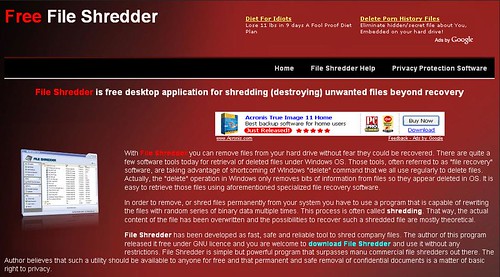
If you really wants to permanently delete some files without possible of recovering them by anyone, what shall we do ? Yes. File Shredding.
File Shredding is an activity wiping your files from computer, totally and securely so it cannot be restore by anyone with any technique. Basically file shredding is operates in a very simple manner. It works by overwriting the files over and over again so the original contents is removed from your hard disk.
You may do this activity manually. However, you may do it using the following File Shredder program which has been developed and FREE for all under GNU license. You may read the Online help here.

Saturday, October 13, 2007
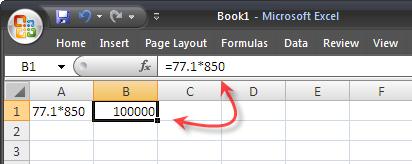
There is a known calculation bug in EXCEL 2007. If you are one of the user of EXCEL 2007, please take serious note on this bug.
Per EXCEL team, this is not really a calculation error but it is just a display error. For example, you type "=77.1*850" in cell A1, then type "=A1+5" in cell A2, you will get 100,000 in cell A1 but 65540 in cell two.
David Gainer has confirmed that this bug was introduced in the EXCEL 2007 version and a fix for this bug is available in below message.
~~~~~~~~~~~~~~~~~~~~~~~~~~~~~~~~~~~~
Calculation Issue Update (Fix Available)
Two weeks ago, we posted about an issue involving the calculation of numbers around 65,535 and 65,536. As of today, fixes for this issue in Excel 2007 and Excel Services 2007 are available for download from the following locations:
Excel 2007: office-kb943075-fullfile-x86-glb.exe
64-bit Excel Services 2007: office-kb943076-fullfile-x64-glb.exe
32-bit Excel Services 2007: office-kb943076-fullfile-x86-glb.exe
KB Articles have been posted as well:
Excel 2007: http://support.microsoft.com/default.aspx/kb/943075/
Excel Services 2007: http://support.microsoft.com/default.aspx/kb/943076
We are in the process of adding this fix to Microsoft Update so that it will get automatically pushed to users running Excel 2007 or Excel Services 2007. Additionally, the fix will also be contained in the first service pack of Office 2007 when it is released (the release date for SP1 of Office 2007 has not been finalized).
Thank you for your patience,
The Excel Team
Published Tuesday, October 09, 2007 5:23 PM by David Gainer~~~~~~~~~~~~~~~~~~~~~~~~~~~~~~~~~~~~
Related Topics
- Blogger Play - Now In iGOOGLE
- Blogger Play - Another way of reading blog...
- ClutterMe - Building Website So Easy
- FREE Tracking Incoming Link Using Technorati URL
- Sketchcast - FREE Online Whiteboard
- FREE Stabil, Safe & Fast Web Browser other than IE
Thursday, October 11, 2007
 is one of the important website providing blog search engine services to bloggers. It provide ranking to blog and track the incoming links to blog. The following images shows the incoming links to famous blogs for last 90 days.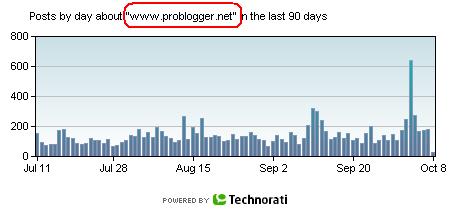
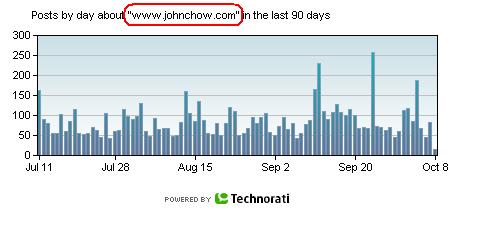
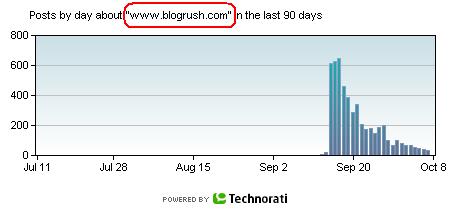
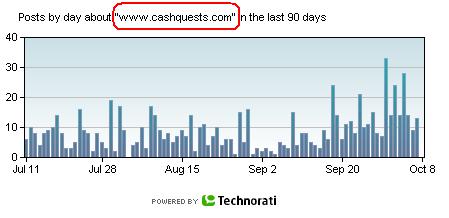
From the incoming links, you may understand magnitude of reaction from other blogger and the criticality and important of your post. Example, since the launching of BlogRush widget, BlogRush receiving very high back links. However it decayed slowly as BlogRush team is carrying out the manual Reviewing and every bloggers are waiting for the new changes.
How to generate Incoming links graph
Pretty simple...enter the following URL to browser address field. It will generate a graph of incoming links to your blog for a given period using a Technorati URL.
http://www.technorati.com/chartimg?q=XXX&days=##&width=460&height=200&type=url
- XXX - Blog address (drop http:// e.g. www.blogrush.com)
- ## - Period e.g. 90 is for 90 days period
- Width & height number e.g. 460 & 200 can be changed as you wish.
Related Topics
Labels: FREE, InTech, Traffic, Utility
Tuesday, September 25, 2007

 launched its world’s first FREE web meeting service (beta version) based on the open source platform. It is a browser-based web 2.0 service that allows users to share their desktop, show slides, talk, listen, chat, and broadcast via webcam.
 Labels: FREE, InTech, Networking, Online, Utility, web meeting, Widget
Monday, September 24, 2007
 ZAP READER neither a FEED reader nor a Text-to-Speech reader but it is just another way to read an article which is full of text.
Try it out and tell me your feedback !
Labels: FREE, Online, Reader, Utility
Saturday, September 22, 2007
 Mozilla finally released Firefox 2.0.0.7 on Sept 18, 2007. No additional feature was added nor changed but it has fixed a Critical flaw in the earlier version 2.0.0.6. Critical here defined as “Vulnerability can be used to run attacker code and install software, requiring no user interaction beyond normal browsing”. You may read flaw here.
Browse the web faster. Get Firefox with Google Toolbar
Those of you who has already installed previous version, strongly suggest you to upgrade.
Firefox has number of add-on which can be added as you wish. There are :
1. ScribeFire (recommended for blogger) An add-on is able to post your blogs from Firefox browser and has many useful features to make blogging easier.
2. Adblock Plus Effectively stops 90-95% of all banner ads, popups, and the like on the Internet.
3. All-in-One Sidebar A sidebar for easy access of downloads, bookmarks, add-ons, themes, and even page sources!
4. FoxyTunes Control iTunes, Windows Media Player, Winamp, and other media player without leaving your Firefox window.
5. Brief An RSS reader
Infact, there are hundreds more out there which you probably interested...
Labels: Browser, Utility, Widget
