
Friday, May 30, 2008
Display problem ? Click HERE

CustomGuide founded in the 1990s by a group of instructors providing customizable computer training and assessments. CustomGuide offers computer training course, reading material, online learning, skills assessment demons and customized computer training. Apart, CustomGuide offers FREE references for Excel, Powerpoint, etc. You may download as you wish :
Microsoft FrontPage
Microsoft Access
Microsoft Excel Microsoft InfoPath
Microsoft Office
Internet Explorer Microsoft Project Microsoft Publisher
Microsoft SharePoint
Microsoft Visio
Microsoft Windows
Microsoft Word
Acrobat for Windows
Dreamweaver for Mac
Fireworks for Windows
Fireworks for Mac
Flash for Windows
Photoshop for Mac
Photoshop Elements for Windows
Computer Training
BELOW are for MAC users
Apple Appleworks
Apple Mac OS
Microsoft Entourage
Microsoft Excel
Microsoft PowerPoint
Microsoft Word
If you have any others (links as well) would like to share with other blog readers, please put in the Comments column
(click here to browse page)

Thursday, November 29, 2007
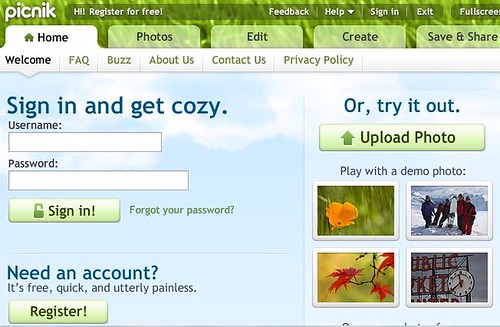
Picnik is one of the many Online Photo Editor. The features provided (FREE) in Picnik are most or less same as Microsoft Photo Editor (but with additional features). If one nice day you are in Cyber Cafe with a computer without Microsoft Photo Editor, Picnik is basically the substitute.
You may use Picnik to obtain or extract photo or image from major well known websites such Flickr, Facebook, Picasa, PhotoBucket and Webshots. In additional, you may search photo from two major search engine Google and Yahoo!. Of course, you can always upload photo from you computer.
Picnik provides FREE basic photo editing such as Rotation, Crop, Resize, Exposure, Exposure, Sharpen, etc. Your may create special effect on your photo such as Black-n-White, Sepia, Boosting and soften, invert, etc. You may put text with different font, size and color in to the photo. Lastly, after you have completed your photo edition, you may provide frame for your photo. Huh...isn't cool ! Try it out !
Related Topic
You may use Picnik to obtain or extract photo or image from major well known websites such Flickr, Facebook, Picasa, PhotoBucket and Webshots. In additional, you may search photo from two major search engine Google and Yahoo!. Of course, you can always upload photo from you computer.
Picnik provides FREE basic photo editing such as Rotation, Crop, Resize, Exposure, Exposure, Sharpen, etc. Your may create special effect on your photo such as Black-n-White, Sepia, Boosting and soften, invert, etc. You may put text with different font, size and color in to the photo. Lastly, after you have completed your photo edition, you may provide frame for your photo. Huh...isn't cool ! Try it out !
Related Topic
Saturday, November 24, 2007
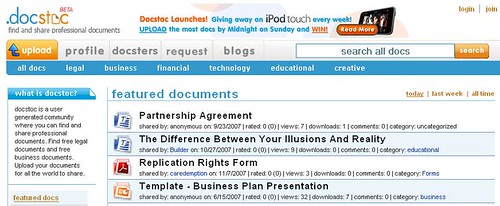
Nowadays, there are many file sharing sites in the market and most (if not all) are offering FREE uploading & packing service. Examples are RapidShare, MegaUpload, etc. These sites are supported by advertisement, premium accounts, etc. These sites are basically operated in the same way until i found docstoc.
docstoc is a user generated community where you can find and share professional documents. Compare to other File Sharing Site, docstoc has the following special features and extras :
Online viewing before downloading
This is one of the best feature available in docstoc. For most File Sharing Site, their only provides Short-cut, the file name is defined by the people who share the file. I have seen a file with blogging tips content in it with the file name of "xde323.pdf". If you found this document, i guess you will just ignore it. Unlike, docstoc provide online viewing feature before you download the file. See example below.
An ebook with title of "Handbook for Blogger and Cyber Dessident". Below is the embedded flash...
You can view the contents before download.
Embedded Flash for viewing in any website
docstoc provides HTML code so that webmaster and blogger can embed the code in the website. Reader and visitor can read the document within the site without living prior to download the file.
Unlimited Storage Size*
Other file sharing sites will probably limit the storage size allocated for FREE account. docstoc offers UNLIMTED Storage size
Unlimited file storage period*
Other file sharing sites will probably limit the file storage period for FREE account. Example 90-days for RapidShare. docstoc offers UNLIMTED file storage period.
Unlimited number of file*
docstoc offers UNLIMITED number of file.
File Privacy
You can share this document within you community. Unlike other file sharing site, anyone can access uploaded files.
Try it out and tell me your experiences.
Related Topics
Online viewing before downloading
This is one of the best feature available in docstoc. For most File Sharing Site, their only provides Short-cut, the file name is defined by the people who share the file. I have seen a file with blogging tips content in it with the file name of "xde323.pdf". If you found this document, i guess you will just ignore it. Unlike, docstoc provide online viewing feature before you download the file. See example below.
An ebook with title of "Handbook for Blogger and Cyber Dessident". Below is the embedded flash...
You can view the contents before download.
Embedded Flash for viewing in any website
docstoc provides HTML code so that webmaster and blogger can embed the code in the website. Reader and visitor can read the document within the site without living prior to download the file.
Unlimited Storage Size*
Other file sharing sites will probably limit the storage size allocated for FREE account. docstoc offers UNLIMTED Storage size
Unlimited file storage period*
Other file sharing sites will probably limit the file storage period for FREE account. Example 90-days for RapidShare. docstoc offers UNLIMTED file storage period.
Unlimited number of file*
docstoc offers UNLIMITED number of file.
File Privacy
You can share this document within you community. Unlike other file sharing site, anyone can access uploaded files.
Try it out and tell me your experiences.
Related Topics
- Permanently & Securely remove file from your hard disk
- RapidShare1 - An Search Engine for RapidShare File Sharing Host Provider
- Web2Pdf - Convert WebContent to Pdf FREE
- youconvertit - FREE Online File conversion
- FREE Online file conversion without software
Saturday, September 29, 2007

Traffic to a blog / website is one of factor possibly bring ultimate success to a blog / website. Many guru out there have recommended ways and approaches to pull visitors to a blog/website and ultimately these visitors may bring new conversion.
One of way is uploading video clip to YouTube. However, this action will increase exposure but may not bring traffic to a blog/website. There are some tips & tricks required to get visitor attention and finally to attract visitors to visit a blog/website.
Following is a video clip "Make Money Online By Uploading Your Video On YouTube" submitted by www.youtube-marketing-advice.com which shows some tricks in getting FREE traffic to a blog/website.
One of way is uploading video clip to YouTube. However, this action will increase exposure but may not bring traffic to a blog/website. There are some tips & tricks required to get visitor attention and finally to attract visitors to visit a blog/website.
Following is a video clip "Make Money Online By Uploading Your Video On YouTube" submitted by www.youtube-marketing-advice.com which shows some tricks in getting FREE traffic to a blog/website.
Labels: Blogging, FREE, Online, Traffic
Tuesday, September 25, 2007

 launched its world’s first FREE web meeting service (beta version) based on the open source platform. It is a browser-based web 2.0 service that allows users to share their desktop, show slides, talk, listen, chat, and broadcast via webcam.
 It make easy to hold a small gatherings, seminars which involve hundreds of attendees. Another best feature is that dimdim is browser based and absolutely no software to download for attendees.
Labels: FREE, InTech, Networking, Online, Utility, web meeting, Widget
Monday, September 24, 2007
 ZAP READER neither a FEED reader nor a Text-to-Speech reader but it is just another way to read an article which is full of text.
According to the Ricky D. Spears, copyright owner of ZAP READER, ZAP Reader is a web based speed reading program. Beta tests showed that reading using ZAP READER can increase reading speed twice as much in half the time (which equivalent to 300% of normal reading speed) !
Another great features of ZAP READER is NO installation is required. Everything will be done online. It works in most browser such as IE, Firefox, and it's FREE !
How to use it ? SIMPLE...It requires you to paste the text which you want to read in a box and click “zap it” button. Next what you see is somewhat funny. One at a time words come in front of you and disappear. Now its your job to concentrate and read all of them else you will have to start all over again. And for the lazy bugs there is always the option to rewind the tape or slow down the speed (change the words per minute).
Watch the following video clip how it works...
Try it out and tell me your feedback !
Labels: FREE, Online, Reader, Utility
